
Make or buy, build or purchase: that's how almost every software decision at mid-sized companies gets framed. The question has a catch. It only knows two answers, and both cost something that isn't in any quote.
If you buy, you almost always adapt your own process to the tool. If you build, you also rebuild everything that already exists. In between sits a third option that fits most often in practice: extend. The standard software stays, and the one process that makes you different gets its own piece of software on top.
The process is the product itself
Rare. Then there's nothing worth buying or extending.
Make
Build your own, start narrow.
The process that wins and keeps your customers
Sometimes the quote, sometimes delivery, sometimes the service afterwards. Usually exactly one.
Extend
Keep the standard, build this process on top.
- Accounting
- Payroll
- Time tracking
- Document storage
- Expenses
Buy
You adapt your process to the tool. That's the right call.
Buy: where standard is right
Accounting, payroll, email, time tracking, document storage: none of these set a company apart from its competitors. No customer picks you because your payroll is special. Here, adapting to the tool is the right move. The vendor tracks regulatory changes, maintains the integration with your tax advisor, and spreads that cost across many customers. Building your own means paying for something that already exists.
The rule of thumb from Why Custom Software? holds: if a standard tool covers 90 percent of your requirements, adapting the remaining 10 percent is usually cheaper than building from scratch.
The rule has a condition that's easy to miss. It only holds as long as those 10 percent aren't the reason customers buy from you.
When buying goes too far
Picture a maker of custom parts with 80 employees. A made-up example, but you'll recognize the situation. What sets them apart isn't in any brochure: whoever calls gets an answer the same day. Customers always know where their order stands, because someone in sales support tells them. And when something doesn't fit the catalog, someone finds a way.
Then comes the new ERP. Good software, properly rolled out. Except now every custom job needs an item master record, and master data creates those once a week. The answer waits for the weekly run. The customer portal shows a status that says nothing about the actual order, so the customer calls again. The special case, once the reason they ordered here, is now a ticket with a queue.
Before
- Call
- Sales support sorts it
- Answer the same day
The special case is the reason the customer orders here.
With the ERP
- Call
- Item record in the weekly runUp to a week of waiting
- Second callPortal status says nothing
The special case is now a ticket with a queue.
Two years later everything runs smoothly. The company works like everyone else on the same system. That's exactly the problem.
The fix still isn't to replace the ERP. Items, bookings and invoices are in good hands there. What's missing is a narrow application for the custom inquiry: sales support records it, sorts it and answers the same day, and only once the order is confirmed does the application create the item in the ERP. The ERP stays, and so does the process.
Three signs you're bending
Every company has one process that wins and keeps customers. Three signs show whether you've adapted that process to a tool.
The list next to the system. Someone maintains a spreadsheet, a table in Teams or a note on the wall, because the system doesn't know something your customers care about. The list isn't your team's failure. It's the process that found no place in the tool.
A new sentence in front of customers. "We can't do it that way." Listen for whether your team says it, and whether they said it before the tool. If not, the system has drawn a line where your strength used to be.
The special case as an exception. The special case used to be the selling point: they'll do what nobody else will. Now it's an exception in the ticket system, with its own category and its own wait. If your best customers mostly order special cases, what they mostly experience now is the wait.
Recognizing one of these doesn't mean replacing the system. It tells you where the system needs an extension.
Extend: keep the standard, add the process
Extending means the standard software stays the system where the data lives. Next to it runs a narrow piece of your own software for exactly that one process. It reads and writes through the official interface, so the vendor keeps maintaining its product and you keep your process. Two examples from our work.
A store in seven languages, without a translation service in front. At LOULEX, translation ran through a service that sat as a layer in front of the store, for €299 a month. Shopify itself didn't know the translations. Today Shopify stays the system for all texts. A bot of our own checks every hour what's missing, translates against a glossary, checks numbers, placeholders and brand terms, and writes the result back as a native Shopify translation. Along the way, six apps were removed; their features now run in the theme.
Accounting that stays where it is. Our own invoices, quotes and payment reminders run through Lexware Office. We're not changing that; it's standard and should stay that way. What we added is an extension through which our own assistant prepares documents and proposes reminders. Approval happens by hand, booking happens in Lexware. We've published the core of it as open source.
Neither time did anyone replace a system. And both times the software adapts to the process, not the other way round.
Make: when the process is the product
Building your own pays off where there's nothing worth extending, because the process itself is the service. We made that call for a company of our own. die macher is our venture in Metzingen, Germany: one point of contact for renovation, conversion and fit-out, with trades from a fixed partner network. die macher advises, gathers quotes and keeps the project together. The contracts for the work are signed directly between the customer and each trade business.
One contact instead of five. Customer, project lead and trades see the same project, each their own part. Had we squeezed that process into an off-the-shelf project tool, we'd have adapted exactly the thing customers come to die macher for. So we built it. Three details show what changes when you do.
From the phone, on site. A portal tradespeople don't use isn't a portal. So the path for the trade is the shortest one: dictate the entry into the phone, attach two photos, done. The model tidies up the text, and the entry is visible to everyone in the project with access.
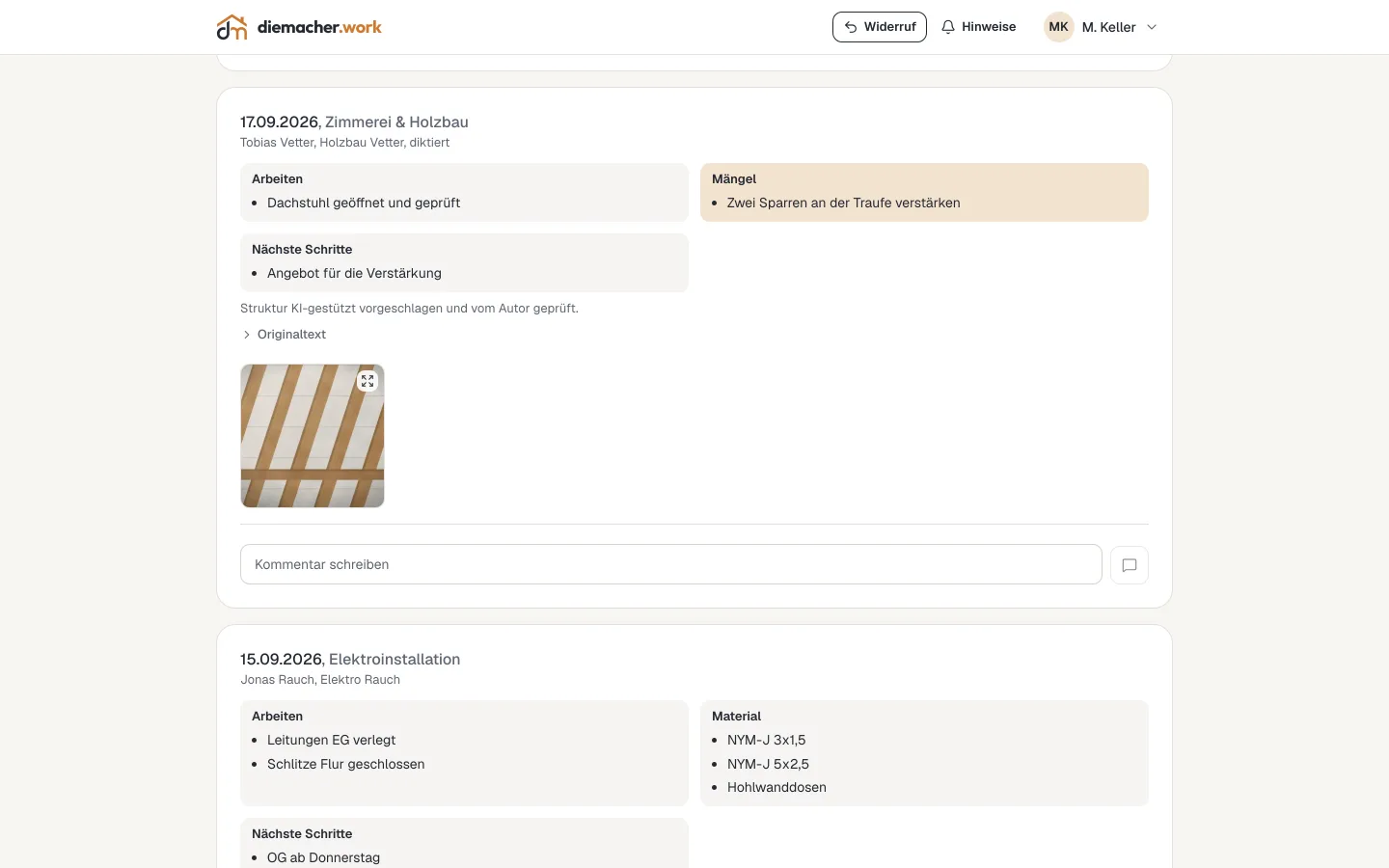 Site diary with a dictated entry and photos. Sample project, no customer data.
One sentence instead of twenty fields. People planning a renovation rarely know which trades they need. So the inquiry doesn't start with a form but with one sentence, typed or spoken. Claude breaks it down into trades, and the result flows straight into the inquiry. Anyone who'd rather skip the AI uses the form.
 The AI entry point on the homepage. Sample project, no customer data.
Permissions that follow the work. The same person can be a trade in one project and the customer in the next. So permissions attach to the role in the project, not to the account: project lead, customer, trade or observer. A trade sees only its own quotes, an observer reads along, the customer decides.
 The same project from the homeowner's view: open quotes, next appointments, progress. Sample project, no customer data.
Even here, not everything is built in-house. Accounting, email and calendar stay standard. Only what sets die macher apart is built. The full setup is in the die macher reference.
The decision
So make or buy is the wrong question. There are three.
Where are you standard? Buy there, adapt, and be glad of it.
Where is your process the edge, but runs on standard software? Extend there. The system stays, and the process gets its own piece of software next to it.
Is the process itself your product? Then build, narrow, and keep buying everything that's standard.
Buy
Processes that run the same in every company
For example
Accounting, payroll, email, storage
Who adapts
You, to the tool
What stays
The tool, maintained by the vendor
Extend
The process that wins customers, on a standard system
For example
Store translation, the custom inquiry next to the ERP
Who adapts
The extension, to your process
What stays
The standard system with all data, the extension talks to it
Make
The process is itself the service you sell
For example
A portal where customer and trades run a project
Who adapts
The software, to your process
What stays
Your own application, standard for the rest
Whether you extend or make: don't build it the way software used to be bought. No specification that anticipates every case. The first version goes to real people with real data after days. What nobody touches gets cut. What's missing shows up in use, not in a workshop.
Frequently asked questions
What does make or buy mean for software?
The decision whether a company has software built (make) or buys off-the-shelf standard software (buy). In practice, a third option is often missing: buy standard software and extend it through its interfaces with the one process that makes the company different (extend).
Standard or custom software: which is cheaper?
For processes that run the same in every company, almost always standard software. The vendor spreads maintenance and regulatory changes across many customers. Standard gets expensive where you have to adapt the process that keeps customers. There, an extension is usually cheaper than building from scratch.
Do I have to replace my ERP to support my process?
Rarely. Usually a narrow application for that one process is enough, talking to the ERP through its interfaces. Items, bookings and invoices stay where they are.
How do I know we've bent to a tool?
Three signs: a list maintained next to the system. A new sentence in front of customers, like “We can't do it that way”. And special cases that used to be the selling point and now come with a wait.
How fast can an extension or custom application be ready?
In the 10-day pilot, a first version on your real data is built in ten working days. What's missing after that shows up in use, not in a specification.


